Getting started
Install
bitig requires Python 3.11+.
Optional extras
uv pip install "bitig[cluster]"     # UMAP + HDBSCAN for reduce/cluster
uv pip install "bitig[bayesian]"    # PyMC + arviz for hierarchical models
uv pip install "bitig[embeddings]"  # sentence-transformers + contextual BERT
uv pip install "bitig[viz]"         # plotly, kaleido, ete3
uv pip install "bitig[reports]"     # weasyprint for PDF report export
uv pip install "bitig[gui]"         # NiceGUI + pywebview for `bitig gui`
uv pip install "bitig[turkish]"     # Stanza backend for Turkish
uv pip install "bitig[docs]"        # mkdocs + material theme (build this site)
The spaCy model is only needed for bitig ingest and the parse-based features in the Python
API; bitig run works on raw text.
English readability needs the CMU pronouncing dictionary, which bitig never downloads on its
own. Install it once with python -m nltk.downloader cmudict; without it the readability
extractor raises an error that names this command.
A study in five commands
bitig init my-study          # (1) scaffold a project directory
cd my-study
# (2) drop .txt files into corpus/ and add corpus/metadata.tsv
#     (tab-separated: a filename column plus author, group, year, ...)
# (3) in study.yaml, uncomment the `metadata: corpus/metadata.tsv` line
bitig info                         # (4) check versions and the configured language
bitig run study.yaml --name demo   # (5) run the declared study
bitig report results/demo --output results/demo/report.html
bitig init creates corpus/, results/, reports/, .bitig/cache/, a .gitignore, a
short README.md and a study.yaml that runs Burrows Delta on the 1000 most frequent words,
grouped by the author metadata column. It does not create metadata.tsv; Delta needs one
with an author column. bitig info prints the bitig, Python, platform and spaCy versions
and, inside a project, the language set in study.yaml. Add more methods to study.yaml
using the schema reference.
bitig run exits with code 1 if any method failed, listing the failed methods (each one's
error.txt holds the traceback). It also refuses to write into a run directory that already
holds a previous run unless you pass --overwrite.
Your first Python session
Run from a directory with a corpus/ folder of .txt files and a corpus/metadata.tsv
(for example a copy of examples/quickstart/,
where the disputed paper is labelled Unknown):
from pathlib import Path

import numpy as np

from bitig import BurrowsDelta, MFWExtractor, PCAReducer, load_corpus, plot_scatter_2d

# Load every .txt file under corpus/ plus its metadata row (filename → author, role, ...).
corpus = load_corpus(Path("corpus"), metadata=Path("corpus/metadata.tsv"))

# 1. Extract the most-frequent-word feature matrix.
fm = MFWExtractor(n=200, scale="zscore", lowercase=True).fit_transform(corpus)

# 2. Fit Burrows Delta on the known documents and attribute the questioned one.
authors = np.array(corpus.metadata_column("author"))
known = authors != "Unknown"
delta = BurrowsDelta().fit(fm.X[known], authors[known])
questioned = [d for d, k in zip(fm.document_ids, known) if not k]
print(dict(zip(questioned, delta.predict(fm.X[~known]).tolist())))
# {'fed_50': 'Madison'}

# 3. Project to two dimensions with PCA and plot.
pca = PCAReducer(n_components=2).fit_transform(fm)
fig = plot_scatter_2d(pca.values["coordinates"], labels=fm.document_ids, groups=list(authors))
fig.savefig("pca.png")
Sample data: the Federalist showcase
Two ready-to-run examples ship with the repo:
examples/quickstart/— a beginner-friendly walkthrough using 9 papers including the disputed No. 50.examples/federalist/— the full 85-paper analysis reproducing the Mosteller & Wallace (1964) result.
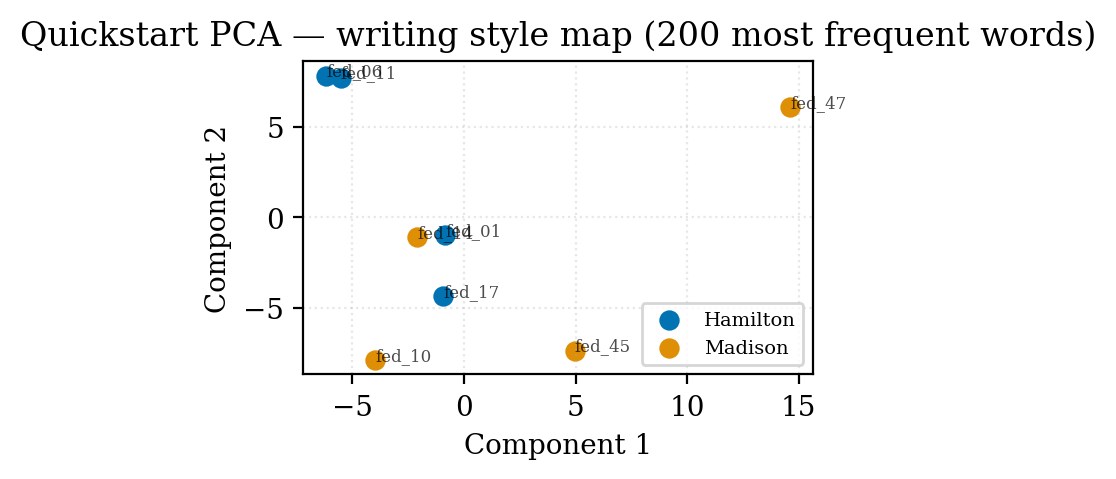
The quickstart study writes this PCA plot of the eight training papers (No. 50 is held out
by the role: [train] filter and attributed separately with
bitig delta ... --test-filter role=test):
Next
- Learn the shared mental model in Concepts.
- Jump into the Forensic toolkit for verification, LR output, and PAN-style evaluation.
- Reproduce Mosteller & Wallace in the Federalist tutorial.